albummaker.
Built into AlbumMakermacOS & Windows Native14-Day Free Pro Trial

Turn Photoshoots into Magazine-Grade Social Teasers in Seconds.

No more wrestling with Photoshop artboards or clunky mobile apps. PostFrame lets wedding and portrait photographers build multi-photo collages, Facebook album teasers, and Instagram carousels with precision typography, smart auto-layout, and native social presets.

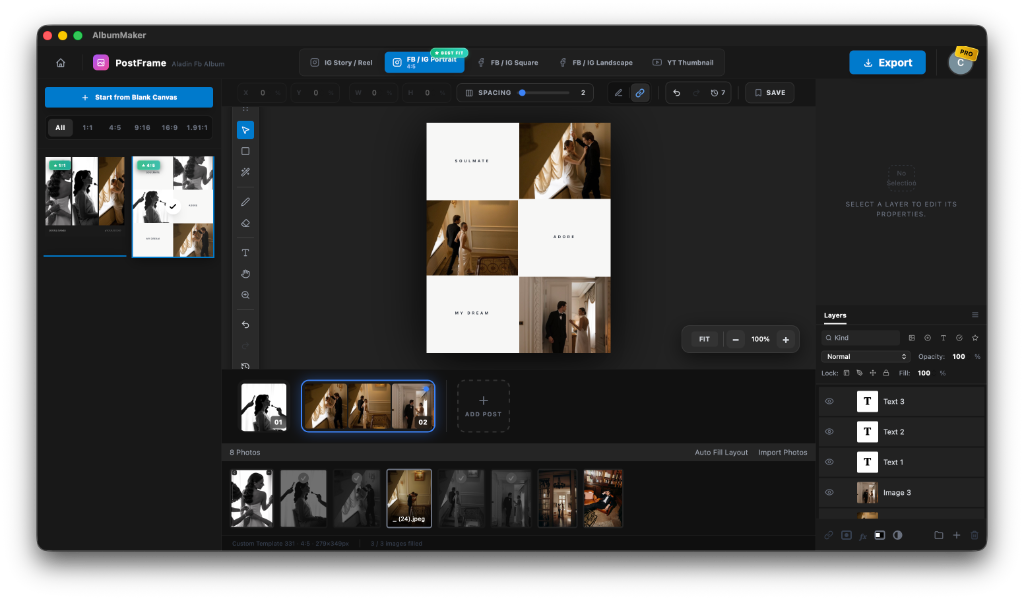
PostFrame user interface inside AlbumMaker software showcasing wedding album collage
< 30 Sec
Average teaser creation
5 Social Presets
4:5, 1:1, 9:16, 1.91:1, 16:9
Full Layers
Photoshop-grade stack
Multi-Post
Carousel filmstrip timeline
< 15MB
AlbumMaker install size
Social Presets

One-Click Social Formats

Instantly toggle between FB / IG Portrait (4:5 Best Fit), FB / IG Square (1:1), IG Story / Reel (9:16), and FB Landscape (1.91:1). No need to memorize pixel sizes.

Layer Engine

Photoshop-Grade Layers

Control every layer with pinpoint precision. Style titles (e.g. SOULMATE, ADORE, MY DREAM), adjust opacity, toggle visibility, and configure spacing with intuitive sliders.

Auto-Fill

Smart Auto-Fill Layouts

Drop in your favorite photos from your shoot and hit Auto Fill Layout. PostFrame populates balanced editorial spreads instantly, saving hours of manual arrangement.

Filmstrip Workflow

Design Entire Multi-Post Teasers in One Project

Why create social posts one by one? With PostFrame’s multi-post filmstrip timeline, you can design Post 01, Post 02, and Post 03 in a single seamless session. Perfect for:

Facebook Wedding Album Teaser series
Swipeable Instagram Carousels (4:5 seamless flow)
Sneak-Peek Story sequences for brides & grooms
Client delivery announcement covers
Try PostFrame in AlbumMaker Free
Built for High-End Social Engagement

Professional wedding photographers report 3× higher reach on Facebook when sharing an editorial collage teaser compared to uploading a random loose image. PostFrame produces the exact magazine-cover aesthetic that clients love sharing with family and friends.

No Photoshop Bloat
Launches in under a second; no heavy RAM consumption.
Zero Cloud Delay
Runs locally on Mac & Win with your original high-res photos.
Simple 3-Step Process

From Raw Photos to Social Teaser in 30 Seconds

Save 20+ minutes of Photoshop frustration on every client photoshoot delivery.

01

Pick Your Social Ratio

Click FB / IG Portrait (4:5), Square (1:1), Story (9:16), or FB Landscape (1.91:1) from the top preset bar.

02

Drop Photos & Auto-Fill

Select your favorite wedding portraits and detail shots. Click Auto Fill Layout or choose from 200+ editorial grid templates.

03

Customize & Export

Tweak titles, adjust spacing, reorder layers, and hit Export. Your teaser is ready to upload to Facebook and Instagram.

Comparison

Why Photographers Prefer PostFrame

See how PostFrame inside AlbumMaker stacks up against standard alternatives.

FeaturePostFrame (AlbumMaker)Adobe PhotoshopCanvaMobile Apps
Creation Speed⚡ Under 30 seconds15+ minutes5-10 minutes10 minutes
Native Social Presets (4:5, 1:1, 9:16)✓ 1-Click IncludedManual Artboards✓Limited
Multi-Post Filmstrip Timeline✓ Unified Project✗ Separate files✗ Separate pages✗
Photoshop-Grade Layers & Typography✓ Full Control✓ Full Control✗ Limited✗ Very Basic
Local High-Res RAW/JPEG Support✓ Zero Upload Time✓ Yes✗ Slow Cloud Upload✗ Compressed
Software Install Footprint✓ Under 15MBHeavy (~4GB)Browser LagMobile Screen
Cost✓ Included in AlbumMaker$23+/month$15/month ProSubscriptions
Complete Photography Suite

Design Teasers with PostFrame. Print Full Albums with AlbumMaker.

PostFrame is just one of the built-in superpowers of AlbumMaker. With AlbumMaker, you can also design complete 80-page wedding albums with AI Magic auto-layouts, send cloud client approval links, and export 300 DPI print-ready PDFs for any lab.

Frequently Asked Questions about PostFrame

Everything you need to know about AlbumMaker.

PostFrame is a specialized feature built directly inside AlbumMaker software. It allows professional wedding and portrait photographers to turn their photoshoots into magazine-quality Facebook album teasers, Instagram carousels, and social media collages with styled typography, custom borders, and Photoshop-grade layer controls.
PostFrame is built natively inside the AlbumMaker desktop application for macOS and Windows. Because it runs locally on your computer, you can work directly with large, high-resolution RAW or JPEG files without waiting for browser uploads or suffering from web app lag.
Creating multi-photo collages in Photoshop requires manually drawing bounding boxes, setting up clipping masks, calculating aspect ratios, and aligning text. PostFrame gives you instant one-click social aspect ratios (4:5, 1:1, 9:16, 1.91:1), 200+ editorial collage templates, an Auto-Fill engine, and full layer control—letting you create a finished teaser in under 30 seconds.
Yes! PostFrame features a multi-post filmstrip timeline at the bottom of the workspace. You can design post 01, post 02, post 03, and easily add more posts to create a coordinated Facebook album preview or Instagram swipeable carousel in one single session.
PostFrame includes dedicated one-click presets for FB / IG Portrait (4:5 — optimal for mobile engagement), FB / IG Square (1:1), IG Story & Reel (9:16), FB / IG Landscape (1.91:1), and YouTube Thumbnail (16:9), as well as a custom blank canvas option.
Yes. PostFrame features a dedicated Photoshop-style Layers panel on the right side. You can add multiple text layers (such as couple names, dates, or editorial words like 'SOULMATE' or 'ADORE'), adjust opacity, fill, blend modes, and change fonts and spacing with precision.
Yes! PostFrame is fully included in AlbumMaker. You can download AlbumMaker for macOS or Windows and test PostFrame along with our full AI album design suite during your 14-Day Free Pro Trial.